1. Overview
TradexCodez Option Trader turns the chart of any stock, index, or future into a complete options trading desk inside MetaTrader 5. You see the live option chain of that instrument, buy or sell any strike with one click, place ready-made strategies, view their profit graphs, and protect every trade with automatic stop-loss and target handling. Orders are sent to your broker through the TradexCodez Bridge running on your computer — nothing is simulated inside MT5.
1.1 What you need
| # | Requirement | Details |
|---|---|---|
| 1.1 | MT5 terminal | With the TradexBridgeData EA running (this is your live data feed) |
| 1.2 | TradexCodez Bridge | The bridge for your broker — Zerodha Kite Connect at launch; Angel One, Flattrade, Shoonya, Dhan and Fyers in final testing — connected with your broker's data API and upgraded to the Option Trader command set (v1.89) |
| 1.3 | TradexCodez Option Trader EA | Attached on the chart of the instrument whose options you want to trade |
| 1.4 | MT5 settings | Keep 'Allow Algo Trading' and 'Allow DLL imports' turned ON. Both are required for the data feed and the panel to work — do not switch them off |
| 1.5 | Connection | Bridge address 127.0.0.1, port 5556 (defaults — change only if you changed them in the bridge) |
When the EA starts it checks the bridge. The footer shows Bridge online (PONG) when everything is connected.
2. Panel tour
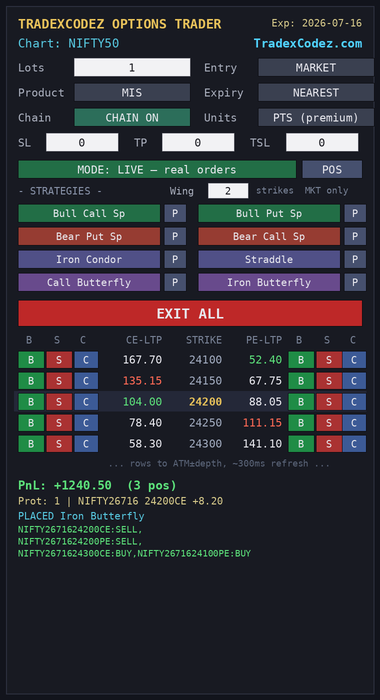
Figure 1 — the full panel: settings, protection, strategies, EXIT ALL, live chain, and the P&L / status footer.
3. Input reference
| Input | Default | What it does |
|---|---|---|
InpHost / InpCmdPort | 127.0.0.1 / 5556 | Where the bridge is listening |
InpTimeoutMs | 6000 | How long to wait for an order reply (milliseconds) |
InpLots | 1 | Lots per click — automatically multiplied by the option's lot size |
InpOrderType | MARKET | Order type for single-strike entries only. All exits and all strategy legs always go as market orders with price protection, per our safety standards |
InpProduct | MIS | MIS (intraday) or NRML (carry forward) |
InpExpiry | NEAREST | Nearest or next expiry — also a button on the panel |
InpWing | 2 | Distance between strategy legs, in strikes (1 to 5) |
InpProtUnits | PTS | Stop/target units: premium points, or percent of your entry price |
InpSL / InpTP / InpTSL | 0 | Stop-loss, target, trailing stop. 0 means off |
InpProtPollSec | 2 | Protection status poll (seconds) |
InpMode | LIVE | LIVE (real orders) or PAPER — simulated on the bridge with realistic bid/ask fills. Also a large toggle button on the panel |
InpPaperCapital | 200000 | Virtual capital for paper mode (sent to the bridge when paper is activated) |
InpChainPollMs | 300 | Chain price refresh in milliseconds |
InpPnlPollMs | 300 | P&L line and positions-popup refresh in milliseconds |
InpFallbackPolls | 2 | Safety net: after this many confirmed breaches the EA itself sends the exit |
InpPanelX / InpPanelY | 20 / 40 | Panel position on the chart |
InpPanelScale | 1.0 | Makes the whole panel bigger or smaller (0.7 to 1.8) |
InpDebounceSec | 2 | Ignores accidental double-clicks inside this window |
InpChainOn | true | Show the option chain at start (also a panel button) |
InpChainDepth | 5 | Strikes shown on EACH side of ATM. 1 to 10 — up to 21 rows |
InpChainChartTF | M5 | Timeframe used when you open an option's own chart |
InpChartBtn | LETTER | Look of the chart-open button: C, arrow, bars, or triangle |
4. The live option chain
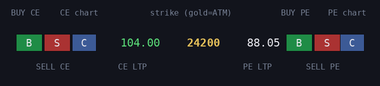
Figure 2 — one chain row, explained.
The chain shows the strikes around the current price, refreshed several times a second (default 300 ms). The at-the-money strike is gold; prices turn green when they tick up and red when they tick down. When the market moves to a new at-the-money strike, the chain re-centers by itself.
B buys that exact strike instantly. S sells it. C opens that option's own price chart in MT5. Smart order handling: if you already hold the opposite position in the same option series, your click squares it off instead of opening a new trade. The chain can never freeze your chart — it refreshes on a timer and backs off automatically if the bridge is busy.
5. Automatic protection (SL / TP / TSL)
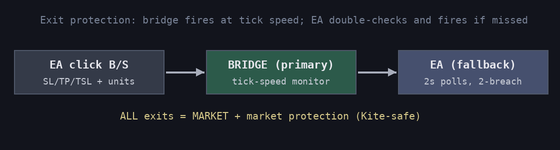
Figure 3 — two layers of protection.
Type your stop-loss, target, and/or trailing stop before clicking B or S (0 = off), and pick the units: premium points, or percent of your entry price. The moment your order fills, the bridge starts watching every tick and fires the exit the instant a level is hit. The EA is the second layer: it independently checks every 2 seconds and sends the exit itself if the first layer ever misses. All protective exits go as market orders with price protection, in line with our safety standards.
6. One-click strategies
Eight professional, defined-risk strategies. One click sends the whole strategy; the bridge places every leg for you — protective (buy) legs first, and if any leg is rejected it automatically unwinds what was already filled and tells you exactly what happened.
| Button | Market view | Legs (w = Wing) | You pay / receive |
|---|---|---|---|
| Bull Call Sp | Rising | Buy CE at-the-money, sell CE w strikes higher | Pay (debit) |
| Bull Put Sp | Rising | Sell PE at-the-money, buy PE w strikes lower | Receive (credit) |
| Bear Put Sp | Falling | Buy PE at-the-money, sell PE w strikes lower | Pay (debit) |
| Bear Call Sp | Falling | Sell CE at-the-money, buy CE w strikes higher | Receive (credit) |
| Iron Condor | Range-bound | Sell CE +w and PE −w, buy CE +2w and PE −2w | Receive (credit) |
| Straddle | Big move either way | Buy CE and PE at-the-money | Pay (debit) |
| Call Butterfly | Pin near ATM | Buy CE ATM−w, sell 2× CE ATM, buy CE ATM+w | Pay (debit) |
| Iron Butterfly | Pin near ATM | Sell CE and PE ATM, buy CE +w and PE −w | Receive (credit) |
The butterflies’ middle leg is automatically doubled (2× lots) — one order, correct quantity. Before ANY strategy or sold option is placed, the bridge runs an upfront margin check (full-basket requirement with hedge benefit plus a safety buffer): if funds are short it replies with the exact need/have/short numbers and places nothing.
Margin note: the credit strategies carry sold options, so your broker's seller margin applies. Stops and targets are not attached to strategy legs — these structures limit risk by design; use EXIT ALL to close them.
7. Payoff diagrams
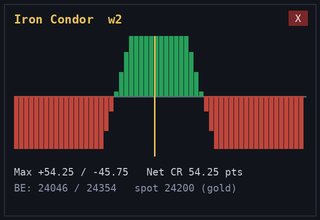
Figure 4 — Iron Condor payoff from live prices.
Press [P] next to any strategy to see its profit picture at expiry, drawn from live option prices. Green is your profit zone, red is loss, the gold line is the current market price — with maximum profit, maximum loss, net cost or credit, and exact breakeven levels below. For Iron Condor keep InpChainDepth at least 2 × Wing.
8. EXIT ALL and the live P&L line
EXIT ALL is your fire escape: one click closes every open option position of this instrument — all expiries, intraday and carry, calls and puts — each as a market order with price protection. The PnL: line is your running profit for the day on this instrument, in rupees, including profits already booked — refreshed every 2 seconds and instantly after every trade.
8b. Paper trading and the positions viewer
The panel starts in LIVE mode. One click on the MODE button switches to PAPER: the panel tints amber, every status is prefixed [PAPER], and all orders are simulated on the bridge with realistic bid/ask fills (buys at ask, sells at bid — you pay the real spread) against your virtual paper capital. Everything works identically in paper — strategies, stops, EXIT ALL, P&L — making it the safe way to learn the panel before trading live.
The POS button opens the positions viewer for the current mode: every open position with quantity, average price, live price, and colored profit, plus the total — refreshing in realtime while open. In paper mode it also shows your capital: Cap / Used / Free.
Automatic reset: if your positions are closed outside the panel (broker app, another tool, or a close-all script), the panel notices within a few seconds, clears the leftover stop/target rules, and resets its display — no stale positions, no orphaned protections.
9. Troubleshooting
| What you see | What it means and what to do |
|---|---|
| Bridge NOT reachable | The bridge program is not running, or the address/port doesn't match. Start the bridge and re-attach the EA |
| Chain: no reply — retrying every 15s | The bridge is up but didn't answer the chain request. Check the bridge window for errors; the panel keeps retrying by itself |
| Chain: no options for (symbol) | No options could be found for this instrument. Confirm options actually trade on it, and that your bridge has the latest Option Trader upgrade |
| Payoff: leg beyond chain | Your Wing is too wide for the visible chain. Raise InpChainDepth to at least 2 × Wing |
| PnL: -- | The bridge hasn't answered the P&L request — usually an older bridge version or an expired broker session. Log in again or update the bridge |
| PARTIAL FILL — CHECK POSITIONS! | One strategy leg was rejected and the bridge unwound the rest. Open your broker position book and verify before trying again |
| Ignored (debounce) | You clicked twice quickly — the second click is ignored on purpose |
| Chart open failed | The option's chart wasn't ready yet. Wait a second and press C again |
10. Frequently asked questions
What is paper mode?
A full simulation running on the bridge with realistic bid/ask fills against virtual capital. The panel starts in LIVE; one click on the MODE button switches to paper (amber panel, [PAPER] on every message). Perfect for learning the panel risk-free.
Does the EA place orders inside MT5?
No. MT5 is your screen; every order travels through the TradexCodez Bridge straight to your broker. What you see in your broker app is the truth.
Which brokers are supported?
At launch, Zerodha Kite Connect. Support for Angel One, Flattrade, Shoonya, Dhan and Fyers is built and in final testing, releasing progressively. Each licence is configured for one broker of your choice.
Will the chain slow down or freeze my charts?
No. It refreshes on a light timer (about three times a second) and backs off automatically if the bridge is busy. It does not consume your live-feed symbol quota.
Can I use it on a stock chart, not just NIFTY?
Yes — attach it on any instrument that has listed options: index, stock, or commodity future.
What happens to my stop-loss if the bridge or my PC restarts?
Protection rules are saved on disk and reload when the bridge restarts. While the bridge is completely offline no orders can reach the broker, so always keep your broker app handy as a manual backup.
Why are all exits market orders?
Speed and certainty. A protective exit that sits unfilled is not protection. Market orders with price protection are our safety standard.
How many strikes can the chain show?
Up to 10 each side of at-the-money — 21 rows. Set InpChainDepth.
Can I run it on several charts at once?
Yes, one panel per instrument. Keep it to a handful of chain charts so your broker's data limits are respected.
The payoff shows -- for a price. Why?
That strike hasn't traded or quoted yet in this session. Wait for the next refresh.
Iron Condor was rejected — why?
Almost always seller margin. The bridge unwound any filled legs automatically; add margin or reduce lots and try again.
11. Custom development by TradexCodez
Everything in this guide was built in-house — and we build for clients too. If you can describe your edge, we can code it:
| Service | What we deliver |
|---|---|
| Custom indicators | Your trading logic as a clean, non-repainting MT5 indicator with alerts |
| Custom Expert Advisors | Panel tools, one-click executors, and rule-based EAs tailored to your workflow |
| Autotrading bots | Fully automated strategies using SEBI-registered broker APIs (Zerodha Kite Connect, with Angel One, Flattrade, Shoonya, Dhan and Fyers releasing progressively) with risk controls built in |
| Broker API bridges | Live data and order routing between MT5 and your broker, like the Universal Bridge that powers this product |
| Dashboards & scanners | Options scanners, market dashboards, and monitoring tools |
Every deliverable ships with documentation and support. Start a conversation at https://www.tradexcodez.com — tell us what you trade and how, and we'll propose the build.
12. Support
TradexCodez is a registered MSME with the Government of India under the Udyam scheme. Udyam Registration No.: UDYAM-TN-08-0141162