MetaTrader 5 Indicators
Three indicators we built for our own charts first — reversal and divergence alerts, Fibonacci levels drawn without you touching a tool, and the numbers you keep checking manually.
TradexCodez_MFI_Signals — reversals and divergence, with alerts
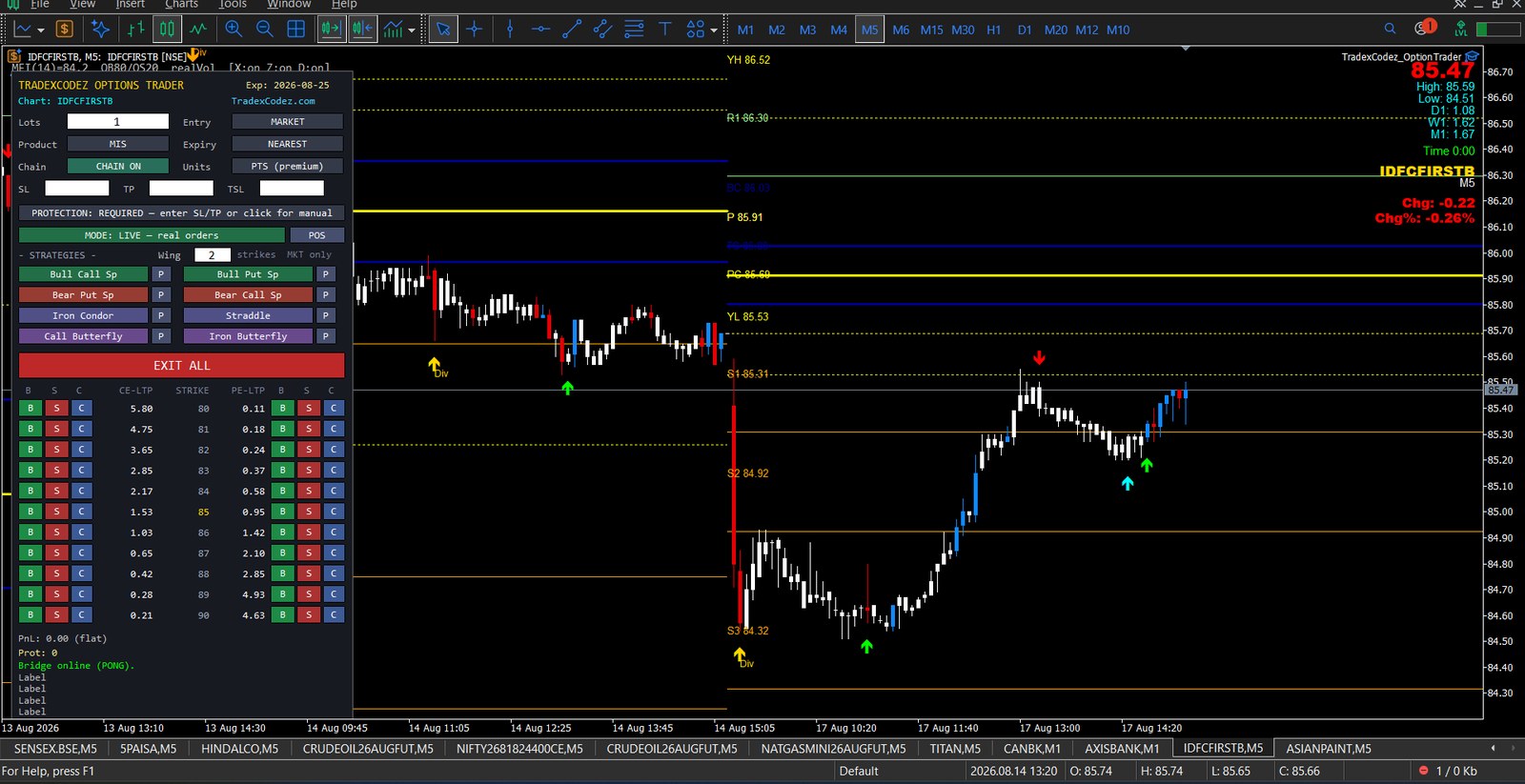
The one we use most. It reads money flow against overbought and oversold bands and flags two things: a turn setting up, and price disagreeing with the flow behind it. Divergence is the signal traders most often spot only in hindsight, on a chart they were not watching at the time — so this one raises an alert rather than waiting to be noticed.
It works on any timeframe and we have found it most reliable on the 5-minute chart, which is where the intraday turns it is looking for actually resolve. Slower charts give fewer signals; faster ones give more noise than edge.
Beyond the reversal and divergence flags it plots an MFI(14) reading with 80/20 bands, real traded volume, and buy and sell markers on the chart itself. The full breakdown, with a live screenshot on an IDFCFIRSTB chart, is on the Options Trader page — it is included with the Premium plan.
Auto Fibonacci — levels drawn for you, on every timeframe
Drawing Fibonacci retracements by hand has a quiet problem: you choose the swing. Two traders on the same chart pick different highs and lows, get different levels, and reach different conclusions — and the same trader picks differently on a Monday than on a Friday.
Auto Fibonacci removes the choice. It identifies the significant high and low itself, on whatever timeframe the chart is set to, and draws the retracement levels from them. Change timeframe and it re-reads the swing for that timeframe. As price makes a new extreme, the levels update.
It is most useful on the daily chart, where the swings it picks up are the ones that matter for positional decisions and where hand-drawn levels go stale fastest. Open a stock, and the levels are already there. If you would rather work the levels out by hand first, our free Fibonacci calculator does retracements, extensions and projections in the browser.
Get it free: AutoFibonacci is published on the MQL5 Market, MetaQuotes’ own store, so it installs straight into MetaTrader 5 from the terminal’s Market tab and updates itself. No payment, no account with us.
See it drawn on a live chart in Lesson 0 of our free Fibonacci course:
Dashboard — the numbers you keep checking manually
Every trader ends up tracking the same handful of figures, and most track them by squinting at the chart or switching windows. The Dashboard puts them on the chart and keeps them current:
- Price labels on the chart, so the level you care about is readable without hovering
- Volume-coloured candles — candle colour carries the volume behind the move, so a push on thin volume looks different from a push on real participation
- Daily high, low and range — how much of today’s move is already spent
- Weekly and monthly ranges — the same question on the timeframes that frame it
- Day’s change in both points and percentage
- Candle timer — how long until the current candle closes, which matters when your rules are close-based
- CPR — the central pivot range plotted on the chart
- Previous-day levels and today’s pivots, drawn automatically each session
Every level is customisable. Turn off what you do not use, change the colours, reposition the panel — a dashboard you have to work around stops getting looked at, so nothing here is fixed.
MetaTrader 4 versions
These are built for MetaTrader 5. If you are on MT4 and want one of them, it is an MQL4 rewrite rather than a copy — compiled MT4 and MT5 indicators are not interchangeable — and we quote that as custom development. Worth knowing before you ask: MT4 cannot chart individual stock option strikes at all, because it has no custom-symbol API.
What is listed here is what we have confirmed working, not the full extent of the tool. Testing is still running and there is more in it than this page claims — we would rather add each item once it has passed than publish a feature list we have to walk back.
See which bundle includes them →